---
title: Scout AI | Exporting & Using Your Data
description: How to get your Scout measurements out of SiteRecon and into your bids.
---
[Skip to content](https://help.siterecon.ai/scout-ai-exporting-using-your-data#main-content)
English - United States
Show submenu for translations

Open main navigation
Close main navigation
- English - United States
Show submenu for translations
- [Contact us](https://meetings.hubspot.com/shubham106/csmproduct)
[Contact us](https://meetings.hubspot.com/shubham106/csmproduct)
Hi, how can we help?
- There are no suggestions because the search field is empty.
1. [SiteRecon University](https://help.siterecon.ai/?hsLang=en-us)
2. [Scout AI](https://help.siterecon.ai/scout-ai?hsLang=en-us)
# Scout AI | Exporting & Using Your Data
## How to get your Scout measurements out of SiteRecon and into your bids.
### **XLS export**
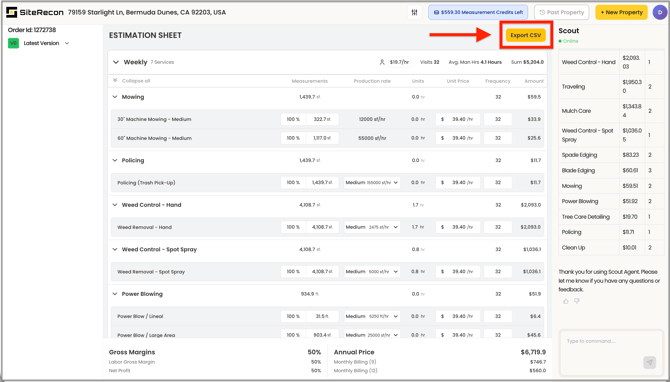
Scout plans include a standard XLS export of your property measurements.
#### **What's in the export:**
- Measurement details by layer
- Takeoff quantities
- Estimation outputs
Exports contain values only — no live formulas — so the numbers stay fixed when you drop them into your own spreadsheets.
**To export:** Open the measured property and select the **Export** option in the property view to download your XLS.
You can also export an image of the property map as a .png — useful for proposals, client presentations, and crew handoffs where a visual of the service areas tells the story faster than numbers.
#### **Using exports in your estimating workflow**
The XLS export gives you measurement quantities you can drop into your own spreadsheets, proposal templates, or pricing models. A common workflow:
**1.** Measure the property in Scout
**2.** Run the standard benchmark takeoff for baseline quantities
**3.** Export to XLS
**4.** Apply your own pricing in your estimating spreadsheet or proposal doc
### **What about CRM integrations?**
Direct integrations with Aspire, ServiceTitan, LMN, SingleOps, Real Green, Jobber, Arborgold, and others are available on SiteRecon's Growth, Teams, and Partner plans — Scout plans use the XLS export.
If you're using one of these systems and want measurement data flowing directly into your estimates and property records, contact sales via online chat, phone, or [sales@siterecon.ai](mailto:sales@siterecon.ai) to discuss the right plan.
#### **Your data stays with you — and stays secure**
- Measured properties are stored in your account with **no storage limit**
- Cancelling a paid Scout plan moves you to the Free plan — you keep access to all of your previously measured properties
- If you later upgrade to Growth, Teams, or Partner, all of your Scout measurements carry over
- SiteRecon is **SOC 2 Type II certified** across all 5 Trust Service Criteria. Review our full security posture, privacy policy, and terms of service at [https://trust.siterecon.ai](https://trust.siterecon.ai)
- [Introduction](https://help.siterecon.ai/introduction?hsLang=en-us)
- [Getting started](https://help.siterecon.ai/getting-started?hsLang=en-us)
- [Order Property Measurements](https://help.siterecon.ai/order-property-measurements?hsLang=en-us)
- [Mapping Tools](https://help.siterecon.ai/mapping-tools?hsLang=en-us)
- [Property Map and Data](https://help.siterecon.ai/property-map-and-data?hsLang=en-us)
- [Sharing and Exports](https://help.siterecon.ai/sharing-and-exports?hsLang=en-us)
- [Plato - SiteRecon's Mobile App](https://help.siterecon.ai/plato-siterecons-mobile-app?hsLang=en-us#main-content)
- [Site Audits (SQA) in Plato](https://help.siterecon.ai/plato-siterecons-mobile-app?hsLang=en-us#site-audits-sqa-in-plato)
- [Notes on Plato](https://help.siterecon.ai/plato-siterecons-mobile-app?hsLang=en-us#notes-on-plato)
- [Find Your Property](https://help.siterecon.ai/plato-siterecons-mobile-app?hsLang=en-us#find-your-property)
- [Using Offline](https://help.siterecon.ai/plato-siterecons-mobile-app?hsLang=en-us#using-offline)
- [Property Views](https://help.siterecon.ai/plato-siterecons-mobile-app?hsLang=en-us#property-views)
- [Plato AI Image Generator](https://help.siterecon.ai/plato-siterecons-mobile-app?hsLang=en-us#plato-ai-image-generator)
- [Using Notes on Web Platform](https://help.siterecon.ai/using-notes-on-web-platform?hsLang=en-us)
- [Integrations](https://help.siterecon.ai/integrations?hsLang=en-us)
- [Admin Controls](https://help.siterecon.ai/admin-controls?hsLang=en-us)
- [Estimation](https://help.siterecon.ai/estimation?hsLang=en-us)
- [Product News](https://help.siterecon.ai/product-news?hsLang=en-us)
- [Scout AI](https://help.siterecon.ai/scout-ai?hsLang=en-us)
[](http://siterecon.ai)
[mailto:info@siterecon.ai](mailto:info@siterecon.ai)
Copyright © 2025, SiteRecon Inc.