---
title: Scout AI
description: See in action how Scout- SiteRecon's AI agent works step by step. Launch measurement, generate estimate and win faster bids.
---
[Skip to content](https://help.siterecon.ai/scout#main-content)
English - United States
Show submenu for translations

Open main navigation
Close main navigation
- English - United States
Show submenu for translations
- [Contact us](https://meetings.hubspot.com/shubham106/csmproduct)
[Contact us](https://meetings.hubspot.com/shubham106/csmproduct)
Hi, how can we help?
- There are no suggestions because the search field is empty.
1. [SiteRecon University](https://help.siterecon.ai/?hsLang=en-us)
2. [Order Property Measurements](https://help.siterecon.ai/order-property-measurements?hsLang=en-us)
# Scout AI
Measuring a property with **Scout AI Takeoff** feels almost effortless.
You start by typing in an address, and in seconds the latest aerial imagery appears, like the site unfolding right in front of you.
The AI steps in and reads the landscape the way a seasoned estimator would—spotting what matters, ignoring the noise.
It quietly measures every turf edge, bed line, and hardscape in just a few minutes. And before you know it, you’re downloading a polished takeoff, complete with quantities and estimates, ready to price and send out with confidence.

### **What are the Steps to Start Measuring?**
1. Login in to your SiteRecon account and then click the link - [https://app.siterecon.ai/agent/](https://app.siterecon.ai/agent/)
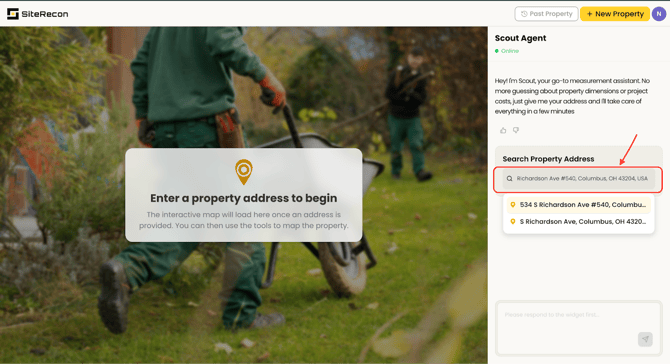
2. Type the property address, and select a suggestion from the dropdown or **press Enter**. The map will load for the selected location, and a **Confirm Address button** will appear.

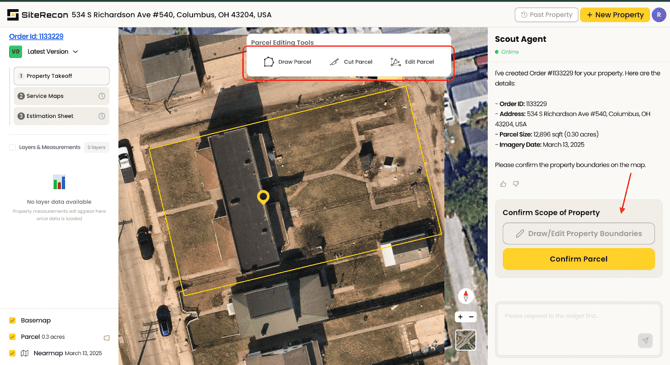
3. SiteRecon will display a parcel boundary based on public records for the selected pin location.
\- If the parcel is correct, **click Confirm Parcel**.
\- If it needs adjustments (e.g., based on scope of work), use the available tools to modify it accordingly.
**Note:** SiteRecon will only measure within the confirmed parcel boundary.
4. Based on the scope of services, Scout will measure the available layers (e.g., Turf, Mulch Beds, Sidewalks, etc.).
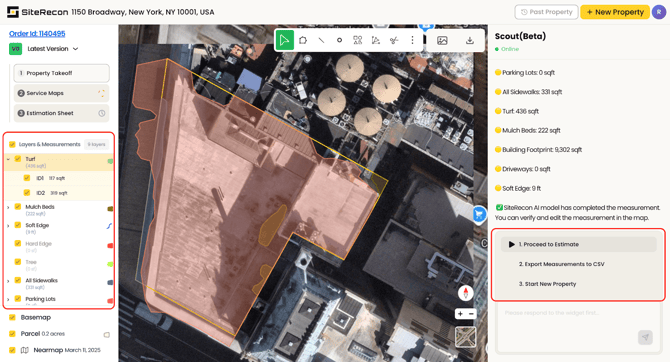
You can processed with the following steps after:
\- Proceed to estimate.
\- Export measurements
\- Start a new property
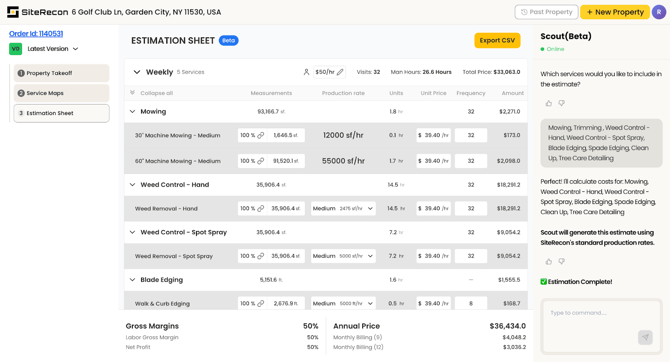
5. Once you hit - proceed to estimate, you can select the services for estimation and click on confirm services.
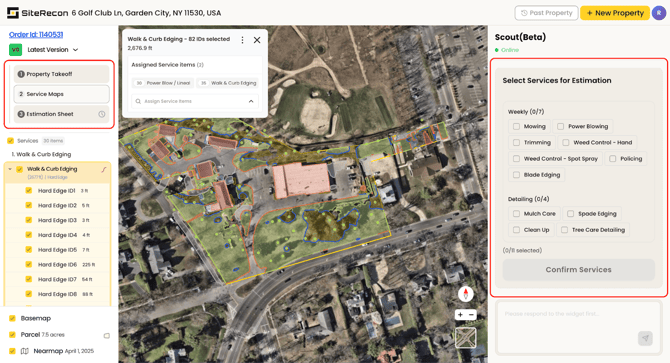
6. Now your estimation is Ready!
### **What exactly does the AI measure?**
**A:** Our AI identifies and measures **turf, beds, parking lots, sidewalks, hardscape, driveways, trees, edges, and more**. Each takeoff includes **areas, linear footage, and count measurements** along with **industry benchmark production rates**.
### **What happens if the imagery is unclear or outdated?**
**A:** The platform automatically pulls the **latest available aerial imagery** for every address. If the imagery quality is insufficient, you can request a manual review from our team or upload blueprints if you're on a paid plan.
### **How long does an AI takeoff take?**
**A:** Most properties are measured in **under 5 minutes**. Larger or more complex sites may take slightly longer.
**Do I need any technical experience to use this?**
**A:** Not at all. Simply **enter an address**, and the AI does the rest. The platform is designed for **estimators, owners, operations managers, and sales teams**—no technical background required.
### **Does AI takeoffs work everywhere?**
**A:** Scout AI performs exceptionally well across the Midwestern regions of the United States. We’re actively expanding and improving performance in additional regions.
### **What’s included in the free trial?**
Your 30-day free trial includes:
- **300 AI measurement credits**
- Measurement of properties up to **20 acres each**
- Industry benchmark production rates
- Coverage for Midwest area currently
- Complete access to the platform and support resources
- [Introduction](https://help.siterecon.ai/introduction?hsLang=en-us)
- [Getting started](https://help.siterecon.ai/getting-started?hsLang=en-us)
- [Order Property Measurements](https://help.siterecon.ai/order-property-measurements?hsLang=en-us)
- [Mapping Tools](https://help.siterecon.ai/mapping-tools?hsLang=en-us)
- [Property Map and Data](https://help.siterecon.ai/property-map-and-data?hsLang=en-us)
- [Sharing and Exports](https://help.siterecon.ai/sharing-and-exports?hsLang=en-us)
- [Plato - SiteRecon's Mobile App](https://help.siterecon.ai/plato-siterecons-mobile-app?hsLang=en-us#main-content)
- [Site Audits (SQA) in Plato](https://help.siterecon.ai/plato-siterecons-mobile-app?hsLang=en-us#site-audits-sqa-in-plato)
- [Notes on Plato](https://help.siterecon.ai/plato-siterecons-mobile-app?hsLang=en-us#notes-on-plato)
- [Find Your Property](https://help.siterecon.ai/plato-siterecons-mobile-app?hsLang=en-us#find-your-property)
- [Using Offline](https://help.siterecon.ai/plato-siterecons-mobile-app?hsLang=en-us#using-offline)
- [Property Views](https://help.siterecon.ai/plato-siterecons-mobile-app?hsLang=en-us#property-views)
- [Plato AI Image Generator](https://help.siterecon.ai/plato-siterecons-mobile-app?hsLang=en-us#plato-ai-image-generator)
- [Using Notes on Web Platform](https://help.siterecon.ai/using-notes-on-web-platform?hsLang=en-us)
- [Integrations](https://help.siterecon.ai/integrations?hsLang=en-us)
- [Admin Controls](https://help.siterecon.ai/admin-controls?hsLang=en-us)
- [Estimation](https://help.siterecon.ai/estimation?hsLang=en-us)
- [Product News](https://help.siterecon.ai/product-news?hsLang=en-us)
- [Scout AI](https://help.siterecon.ai/scout-ai?hsLang=en-us)
[](http://siterecon.ai)
[mailto:info@siterecon.ai](mailto:info@siterecon.ai)
Copyright © 2025, SiteRecon Inc.