---
title: How to order an Estimate in SiteRecon?
description: Order takeoffs and estimates in one step with SiteRecon. Get map-tied, line-item bids delivered fast, ready for proposals or CRM export.
---
[Skip to content](https://help.siterecon.ai/how-to-order-an-estimate-in-siterecon#main-content)
English - United States
Show submenu for translations

Open main navigation
Close main navigation
- English - United States
Show submenu for translations
- [Contact us](https://meetings.hubspot.com/shubham106/csmproduct)
[Contact us](https://meetings.hubspot.com/shubham106/csmproduct)
Hi, how can we help?
- There are no suggestions because the search field is empty.
1. [SiteRecon University](https://help.siterecon.ai/?hsLang=en-us)
2. [Estimation](https://help.siterecon.ai/estimation?hsLang=en-us)
# How to order an Estimate in SiteRecon?
## With SiteRecon’s unified workflow, you can now order both takeoffs and estimates in one step. Our team delivers not just measurements, but a complete, line-item estimate tied directly to the map—complete with service items, production rates, and proposal-ready outputs. This guide explains when to order an estimate, how to place your order, and what happens after delivery.
SiteRecon now allows you to order **takeoffs and estimates in one unified workflow,** saving time, reducing handoffs, and giving you ready-to-use bids straight from the map.
Note: Estimation ordering is available to users on the Partner Plan or higher. Contact your SiteRecon Account Manager if you don’t see the option in your workspace.
### What Happens When You Order an Estimate?
When you order an estimate, SiteRecon’s team does more than just measure the site, we also generate a complete, **line-item estimate** tied directly to the map.
Here’s what you receive:
| Included in Delivery | Description |
| --- | --- |
| **Completed Takeoff** | With all relevant service layers (turf, beds, edges, etc.) |
| **Mapped Service Items** | Layers broken down into estimating-ready services (e.g., mower types) |
| **Applied Production Rates** | Industry-standard or customer-provided, depending on your workspace setup |
| **Line-Item Estimate** | Including quantities, units, unit rates, and total price |
| **Proposal-Ready Output** | You can export this as a PDF or send to your CRM |
This eliminates the need to convert measurements into spreadsheet formulas or plug numbers into estimating software manually. It’s all done for you.
### When Should You Order an Estimate?
Order an estimate when you:
- Want a **fully priced bid** for a property (not just measurements)
- Need to **move fast on a proposal** and don’t have time for manual estimating
- Are training new estimators and want to set a benchmark
If you just want measurements and plan to estimate manually, you can order a takeoff only.
### How Long Does It Take?
Your estimate will be delivered within the timeline committed in your plan.
- **Partner Plan (Standard Delivery)**: Within 24 hours
- **Express Orders (if enabled)**: Faster delivery at additional credit cost
### How to Order an Estimate
Here is a step-wise process of placing an estimation order at SiteRecon:
1. Login to SiteRecon
2. Click on “Create Property” on the dashboard
.png?width=670&height=199&name=Create%20Property%20SS1%20(2).png)
3. Enter property address in the search bar
.png?width=670&height=269&name=Property%20Address%20SS%20(1).png)
4. Select “Estimation Order” and then click on “Create Order”
.png?width=670&height=265&name=Estimation%20Order%20SS%20(1).png)
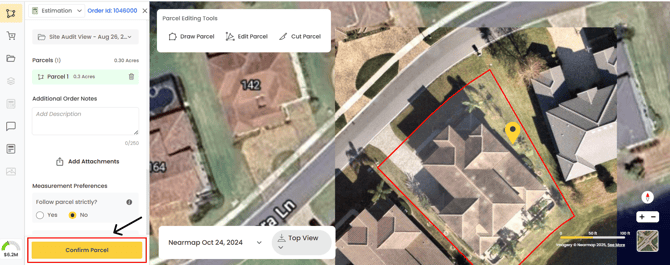
5. Click on “Confirm Parcel”. You can draw, edit, and cut parcel at this stage as well before confirming
6. After you confirm the parcel, a pop-up shows up with all the services packages. Select the packages based on your requirements and then click on “Done” and then click on “Get Estimate”
.png?width=670&height=289&name=Packages%20SS%20(1).png)
7. Your estimation has now been placed. You next see the progress of your order on the screen
.png?width=670&height=289&name=Estimation%20Progress%20SS%20(1).png)
### After You Place the Order
Once your estimate is delivered:
- You’ll receive an email
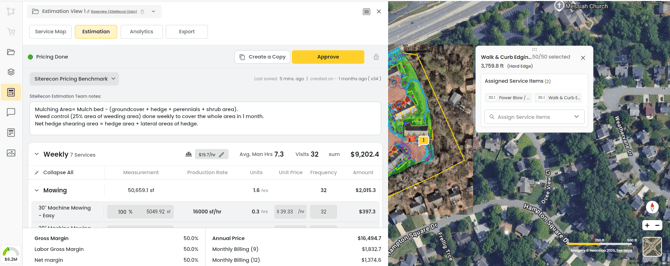
- Open the property and click on **“Baseview”** to view the line-item breakdown
.png?width=670&height=265&name=Base%20view%20SS%20(1).png)
- This is how your estimation will look like:
- Click on “Service Map” to see how your services will look tied to the map
.png?width=670&height=268&name=Service%20Map%20SS%20(1).png)
- Click on “Analytics” to view detailed insights about your estimate
.png?width=670&height=393&name=Estimation%20Analytics%20SS%20(1).png)
- To download and export the pricing details, click on the Export. You can download the estimation in the form of a PDF or export into an Excel Sheet.
Note:
- You can not edit the “Baseview Estimate”.
- To edit an estimation order, you will have to create a copy of the baseview and then you can edit the copy.
- [Introduction](https://help.siterecon.ai/introduction?hsLang=en-us)
- [Getting started](https://help.siterecon.ai/getting-started?hsLang=en-us)
- [Order Property Measurements](https://help.siterecon.ai/order-property-measurements?hsLang=en-us)
- [Mapping Tools](https://help.siterecon.ai/mapping-tools?hsLang=en-us)
- [Property Map and Data](https://help.siterecon.ai/property-map-and-data?hsLang=en-us)
- [Sharing and Exports](https://help.siterecon.ai/sharing-and-exports?hsLang=en-us)
- [Plato - SiteRecon's Mobile App](https://help.siterecon.ai/plato-siterecons-mobile-app?hsLang=en-us#main-content)
- [Site Audits (SQA) in Plato](https://help.siterecon.ai/plato-siterecons-mobile-app?hsLang=en-us#site-audits-sqa-in-plato)
- [Notes on Plato](https://help.siterecon.ai/plato-siterecons-mobile-app?hsLang=en-us#notes-on-plato)
- [Find Your Property](https://help.siterecon.ai/plato-siterecons-mobile-app?hsLang=en-us#find-your-property)
- [Using Offline](https://help.siterecon.ai/plato-siterecons-mobile-app?hsLang=en-us#using-offline)
- [Property Views](https://help.siterecon.ai/plato-siterecons-mobile-app?hsLang=en-us#property-views)
- [Plato AI Image Generator](https://help.siterecon.ai/plato-siterecons-mobile-app?hsLang=en-us#plato-ai-image-generator)
- [Using Notes on Web Platform](https://help.siterecon.ai/using-notes-on-web-platform?hsLang=en-us)
- [Integrations](https://help.siterecon.ai/integrations?hsLang=en-us)
- [Admin Controls](https://help.siterecon.ai/admin-controls?hsLang=en-us)
- [Estimation](https://help.siterecon.ai/estimation?hsLang=en-us)
- [Product News](https://help.siterecon.ai/product-news?hsLang=en-us)
- [Scout AI](https://help.siterecon.ai/scout-ai?hsLang=en-us)
[](http://siterecon.ai)
[mailto:info@siterecon.ai](mailto:info@siterecon.ai)
Copyright © 2025, SiteRecon Inc.